

Not just parent - child relationship, but JQuery also provides effective methods to deal with siblings. And which all elements are siblings?
Let us see in the below example,
<html>
  	<head>
    	<title> My First Programme </title>
  	</head>

  	<body>
    	<h1> JQuery </h1>

    	<div>
    		<span>
    			<p> This is Sibling one </p>
    			<span> This is Sibling two </span>
    			<div> This is Sibling three </div>
    		</span>
    	</div>

        <button> Click Me </button>

        <script src = "https://ajax.googleapis.com/ajax/libs/jquery/3.7.1/jquery.min.js"> </script>

    	<script>

			$('button').click(function(){
				$("p").siblings().css({"color": "blue"});
            });

    	</script>

  	</body>
</html>
In the above example, we have the <div> element. And the <div> element has a child <span>, and the <span> element has three children i.e. <p>, <span> and <div>.
<div>
	<span>
		<p> This is Sibling one </p>
		<span> This is Sibling two </span>
		<div> This is Sibling three </div>
	</span>
</div>
Now, let us see the below structure,
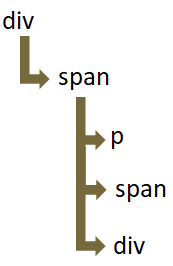
So, just like a normal family hierarchy, the <span> element has three children i.e. <p>, <span> and <div>.
So, <p>, <span> and <div> are siblings.
And the siblings() method changes the color of <span> and <div> elements. Since, <span> and <div> elements are siblings of <p>.
$('button').click(function(){
	$("p").siblings().css({"color": "blue"});
});Similarly, there are other methods that helps us find the siblings. Let us see them below,
The next() method gives us the next sibling of the specified element.
<html>
  	<head>
    	<title> My First Programme </title>
  	</head>

  	<body>
    	<h1> JQuery </h1>

    	<div>
    		<span>
    			<p> This is Sibling one </p>
    			<span> This is Sibling two </span>
    			<div> This is Sibling three </div>
    		</span>
    	</div>

        <button> Click Me </button>

        <script src = "https://ajax.googleapis.com/ajax/libs/jquery/3.7.1/jquery.min.js"> </script>

    	<script>

			$('button').click(function(){
				$("p").next().css({"color": "blue"});
            });

    	</script>

  	</body>
</html>
In the above example, we have the <div> element. And the <div> element has a child <span>, and the <span> element has three children i.e. <p>, <span> and <div>.
<div>
	<span>
		<p> This is Sibling one </p>
		<span> This is Sibling two </span>
		<div> This is Sibling three </div>
	</span>
</div>
Now, let us see the below structure,
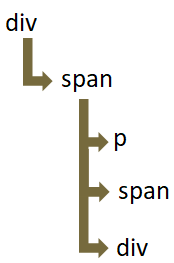
So, the <span> element has three children i.e. <p>, <span> and <div>.
And the next() method changes the color of <span> element only. Since, <span> is the next sibling of <p>.
$('button').click(function(){
	$("p").next().css({"color": "blue"});
});The next() method gives us all the next sibling of the specified element.
<html>
  	<head>
    	<title> My First Programme </title>
  	</head>

  	<body>
    	<h1> JQuery </h1>

    	<div>
    		<span>
    			<p> This is Sibling one </p>
    			<span> This is Sibling two </span>
    			<div> This is Sibling three </div>
    		</span>
    	</div>

        <button> Click Me </button>

        <script src = "https://ajax.googleapis.com/ajax/libs/jquery/3.7.1/jquery.min.js"> </script>

    	<script>

			$('button').click(function(){
				$("p").nextAll().css({"color": "blue"});
            });

    	</script>

  	</body>
</html>
In the above example, we have the <div> element. And the <div> element has a child <span>, and the <span> element has three children i.e. <p>, <span> and <div>.
<div>
	<span>
		<p> This is Sibling one </p>
		<span> This is Sibling two </span>
		<div> This is Sibling three </div>
	</span>
</div>
Now, let us see the below structure,
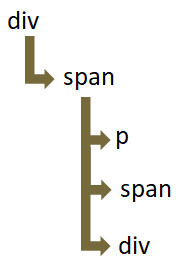
So, the <span> element has three children i.e. <p>, <span> and <div>.
And the nextAll() method changes the color of <span> and <div> element. Since, nextAll() methods selects all the siblings next to <p>.
$('button').click(function(){
	$("p").nextAll().css({"color": "blue"});
});The nextUntil() method gives us all the next siblings until a specified element.
<html>
  	<head>
    	<title> My First Programme </title>
  	</head>

  	<body>
    	<h1> JQuery </h1>

    	<div>
    		<span>
    			<p> This is Sibling one </p>
    			<span> This is Sibling two </span>
    			<div> This is Sibling three </div>
    		</span>
    	</div>

        <button> Click Me </button>

        <script src = "https://ajax.googleapis.com/ajax/libs/jquery/3.7.1/jquery.min.js"> </script>

    	<script>

			$('button').click(function(){
				$("p").nextUntil("div").css({"color": "blue"});
            });

    	</script>

  	</body>
</html>
In the above example, we have the <div> element. And the <div> element has a child <span>, and the <span> element has three children i.e. <p>, <span> and <div>.
<div>
	<span>
		<p> This is Sibling one </p>
		<span> This is Sibling two </span>
		<div> This is Sibling three </div>
	</span>
</div>
Now, let us see the below structure,
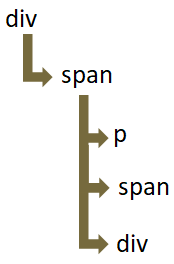
So, the <span> element has three children i.e. <p>, <span> and <div>.
And the nextUntil() method changes only the color of <span> element.
$('button').click(function(){
	$("p").nextUntil("div").css({"color": "blue"});
});The prev() method gives us the previous sibling of the specified element.
<html>
  	<head>
    	<title> My First Programme </title>
  	</head>

  	<body>
    	<h1> JQuery </h1>

    	<div>
    		<span>
    			<p> This is Sibling one </p>
    			<span> This is Sibling two </span>
    			<div> This is Sibling three </div>
    		</span>
    	</div>

        <button> Click Me </button>

        <script src = "https://ajax.googleapis.com/ajax/libs/jquery/3.7.1/jquery.min.js"> </script>

    	<script>

			$('button').click(function(){
				$("div").prev().css({"color": "blue"});
            });

    	</script>

  	</body>
</html>
The prevAll() method gives us all the previous sibling of the specified element.
<html>
  	<head>
    	<title> My First Programme </title>
  	</head>

  	<body>
    	<h1> JQuery </h1>

    	<div>
    		<span>
    			<p> This is Sibling one </p>
    			<span> This is Sibling two </span>
    			<div> This is Sibling three </div>
    		</span>
    	</div>

        <button> Click Me </button>

        <script src = "https://ajax.googleapis.com/ajax/libs/jquery/3.7.1/jquery.min.js"> </script>

    	<script>

			$('button').click(function(){
				$("p").prevAll().css({"color": "blue"});
            });

    	</script>

  	</body>
</html>
The prevUntil() method gives us all the previous siblings until a specified element.
<html>
  	<head>
    	<title> My First Programme </title>
  	</head>

  	<body>
    	<h1> JQuery </h1>

    	<div>
    		<span>
    			<p> This is Sibling one </p>
    			<span> This is Sibling two </span>
    			<div> This is Sibling three </div>
    		</span>
    	</div>

        <button> Click Me </button>

        <script src = "https://ajax.googleapis.com/ajax/libs/jquery/3.7.1/jquery.min.js"> </script>

    	<script>

			$('button').click(function(){
				$("p").nextUntil("div").css({"color": "blue"});
            });

    	</script>

  	</body>
</html>