
Have you ever seen that some elements in HTML pages are separated from other elements. This can be achieved using Margins in CSS.
Margins in CSS are used to create a hidden space between the HTML elements.
There are four properties that helps us create the margins.
Let us understand the four properties in action with the below example.
<html>
<head>
	<style>
		p {
  			margin-top: 50px;
  			margin-right: 100px;
  			margin-bottom: 70px;
  			margin-left: 80px;
  		}
	</style>
</head>

<body>
	<p>
		This is the first paragraph.
	</p>
</body>
</html>
So, if you see the above output, there are spaces around the <p> element.
<p>
	This is the first paragraph.
</p>
And it happens with the four properties, margin-top, margin-right, margin-bottom and margin-left.
Empty spaces are drawn across the <p> element due to the above properties.
<style>
	p {
		margin-top: 50px;
		margin-right: 100px;
		margin-bottom: 70px;
		margin-left: 80px;
	}
</style>
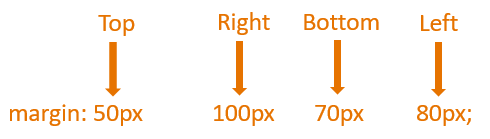
Now, the above four properties can be clubbed into a single property called the margin property.
Let us see it next.
The margin property in CSS is a clubbed version of margin-top, margin-right, margin-bottom and margin-left properties.
Let us rewrite the above example with the margin property.
<html>
<head>
	<style>
		p {
  			margin: 50px 100px 70px 80px;
  		}
	</style>
</head>

<body>
	<p>
		This is the first paragraph.
	</p>
</body>
</html>
So, in the above example, we have taken the values of margin-top, margin-right, margin-bottom and margin-left properties(From the previous example) and placed it into the margin property.
<style>
	p {
		margin: 50px 100px 70px 80px;
	}
</style>
And we get exactly same number of spaces across the <p> element.