CSS Syntax usually contains a Selector with property and value pairs.
To understand CSS Syntax, let us take the example of an HTML paragraph element(i.e. <p>).And we want to change the color of the contents of the <p> element to red.
<html>
<head>
	<style>
		p {
  			color: red;
  		}
	</style>
</head>

<body>
    <p>This is the first paragraph</p>
</body>
</html>
So, in the above example, we have used Internal CSS to demonstrate CSS syntax. An InternalCSS is where the CSS properties are written inside the HTML file within the <style> element.
<style>
	p {
		color: red;
	}
</style>
Now, coming to the CSS Syntax.
p {
	color: red;
}
There are three elements that CSS syntax contains.
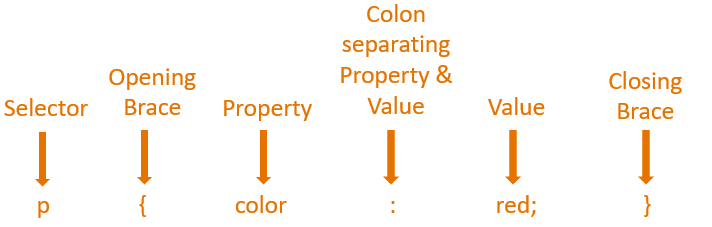
So, with the above CSS, the color of the text, This is the first paragraph inside the<p> element changes to red.
<p>This is the first paragraph</p>
This is because we have set the value of the color Property to red.
p {
	color: red;
}Now, let us see how can we have multiple property value pairs in CSS.
<html>
<head>
	<style>
		p {
  			color: red;
  			font-size: 40px;
  		}
	</style>
</head>

<body>
    <p>This is the first paragraph</p>
</body>
</html>
Now, let us say, we want to increase the size of the text for the contents of the <p> elementalong with the color red.
And we added the property value pair(i.e. font-size: 40px;) for the p selector.
<style>
	p {
		color: red;
		font-size: 40px;
	}
</style>
Just remember, we can add multiple property value pairs separated by semicolon(i.e. ;).