

The Multiple Class Selector is used to select multiple elements with multiple class names.
<html>
  	<head>
    	<title> My First Programme </title>
  	</head>

  	<body>
    	<h1> JQuery </h1>
    	<p class = "para1"> First Paragraph </p>
    	<p class = "para2"> Second Paragraph </p>
    	<p class = "para3"> Third Paragraph </p>

    	<script src = "https://ajax.googleapis.com/ajax/libs/jquery/3.7.1/jquery.min.js"> </script>

      	<script>

			$('p.para1, p.para2').text("My New First Paragraph");

      	</script>
  	</body>
</html>
So, if you see the above output. We can see that the content of the first <p> tag,
<p class = "para1"> First Paragraph </p>
And the second <p> tag,
<p class = "para2"> Second Paragraph </p>
Got changed to My New First Paragraph.
And this happened with the one liner code of JQuery.
<script>
	$('p.para1, p.para2').text("My New First Paragraph");
</script>
In the JQuery code we have located the <p> element and specified the class name followed by .' i.e. p.para1 and p.para2.
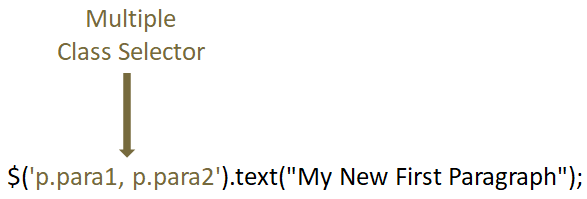
Just remember, in the class selector, the class name should start with a dot '.' i.e. p.para1.
The above JQuery code can also be written as,
$('.para1').text("My New First Paragraph");So, when JQuery finds that a selector starts with a dot '.' (i.e. .para1), it assumes that we ar searching for a CSS class.
And finds that there are three elements with class attribute.
<p class = "para1"> First Paragraph </p>
<p class = "para2"> Second Paragraph </p>
<p class = "para3"> Third Paragraph </p>
And the first attribute,
<p class = "para1"> First Paragraph </p>
And the second attribute,
<p class = "para2"> Second Paragraph </p>
Matches with the class name para1 and para2. And changes its content with My New First Paragraph.
<html>
  	<head>
    	<title> My First Programme </title>
  	</head>

  	<body>
    	<h1> JQuery </h1>
    	<p class = "para1"> First Paragraph </p>
    	<p class = "para2"> Second Paragraph </p>
    	<p class = "para3"> Third Paragraph </p>

    	<script src = "https://ajax.googleapis.com/ajax/libs/jquery/3.7.1/jquery.min.js"> </script>

      	<script>

			$('.para1, .para2').text("My New First Paragraph");

      	</script>
  	</body>
</html>